Loading documentation
The dashboard is your signed-in Karwa workspace. Use the main navigation to move between hiring areas, then use the account menu for personal preferences and workspace settings. Menus and available actions can depend on permissions, workspace setup and subscription access.
The workspace at a glance
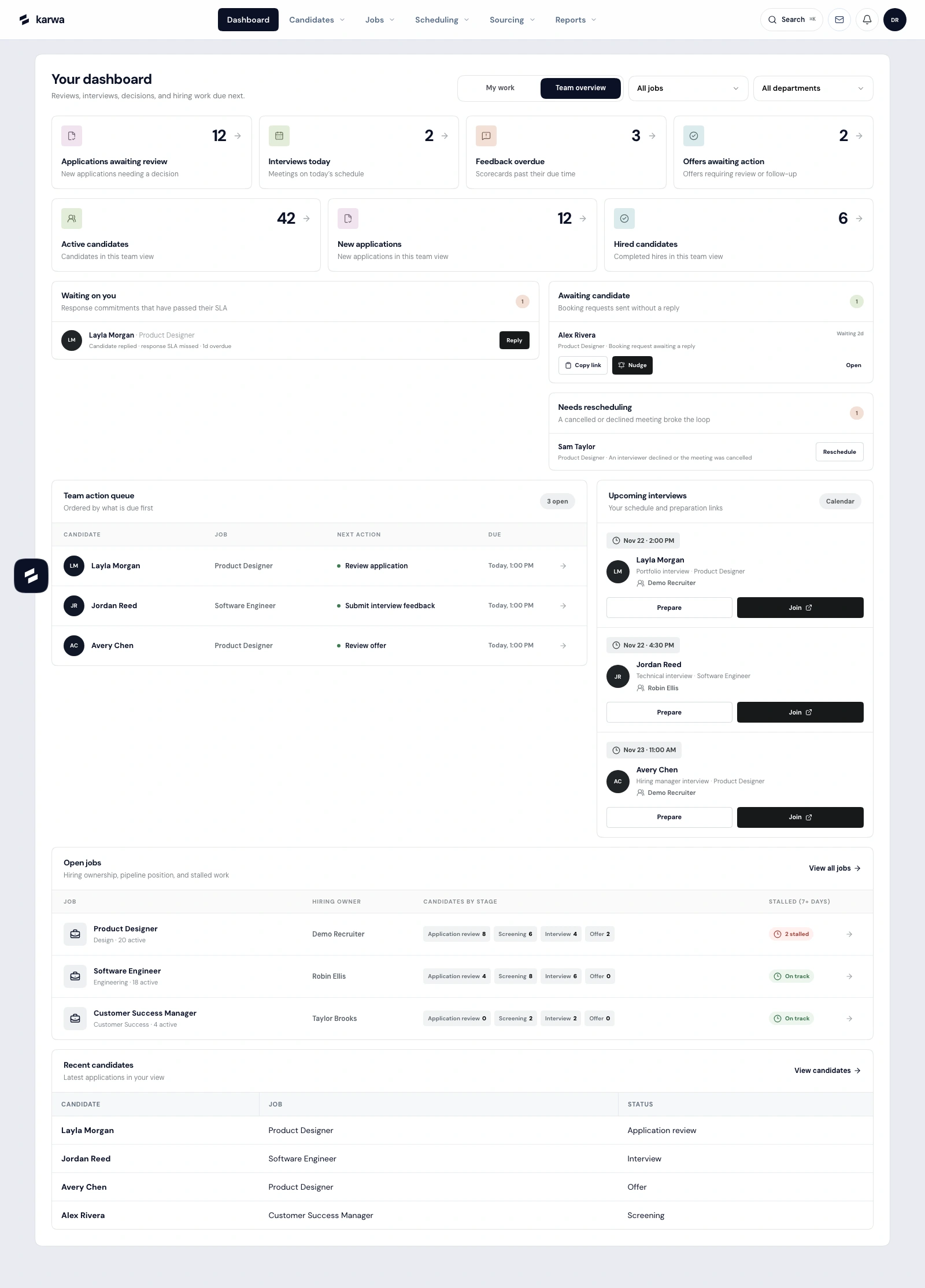
Open the full-size Team overview screenshot.
This screenshot shows an example recruiter workspace. For the meaning of every home card and panel, read Understand your default dashboard.
Main navigation
| Area | Pages and purpose | Read next |
|---|---|---|
| Dashboard | Your standard hiring priorities, interviews and pipeline overview, or your saved home dashboard. | Default dashboard guide. |
| Candidates | Add candidate creates or adds a person; All candidates searches candidate records and applications; Take-home submissions gathers submitted work; Referrals tracks referred applicants. | Add a candidate, candidate profile, take-home submissions, referrals. |
| Jobs | Add job starts a role; All jobs finds roles by lifecycle status. Open a job to manage its pipeline, dashboard, settings, openings, interview plan and postings. | Create and publish a job, job workspace, job postings. |
| Scheduling | Requests manages booking and coordination; Calendar shows meetings over time; Interviews lists interview work. | Scheduling requests, calendar, manage interviews. |
| Sourcing | Leads organizes prospective candidates, Talent pools groups people for future roles, and Sequences supports structured outreach. | Source and revisit candidates. |
| Reports | Hiring funnel, Sourcing & outreach, Interviews & scheduling, Offers, Candidate experience, Quality of hire, Hiring plan & costs, Compliance, and Integrity & verification organize reporting questions. The Reports entry opens custom report pages. | Understand hiring reports, choose and interpret reports, dashboard item catalog. |
An area appearing in navigation does not prove that you may read every record or perform every action there. For example, Add job requires job-management permission and Add candidate depends on candidate access. A product description does not establish that a provider is connected or a workflow is configured.
Search, inbox and notifications
Use global search to find accessible candidates, jobs, plans, templates, settings and actions. A candidate may have multiple applications: confirm the job shown in the result before changing a stage or sending a message.
Open Inbox for workspace conversations. Open the notification bell for recorded notifications and their destinations. Notifications can be marked read or dismissed; these are different from completing the underlying candidate task. Configure delivery in Notification settings.
Account menu and all settings
Open your profile mark in the top navigation. The Account group includes Profile & account, My requests, security and appearance. The Workspace group includes subscription/billing and usage/AI credits. All settings opens the settings catalog; use its groups and search to find the specific page.
| Settings area | What belongs there | Detailed guide |
|---|---|---|
| Personal account | Your profile, account security, sessions and appearance. | Profile & account, security and sessions, appearance. |
| Organization and access | Company details, brands, people, roles, departments and locations. | Company profile, brands, employees and access, roles and permissions, departments, locations. |
| Recruiting and forms | Job templates, sources, archive/close reasons, tags, custom fields, application forms, questionnaires, feedback forms and take-homes. |
A daily route through Karwa
- Start on Your dashboard, choose the right scope and review overdue work.
- Open the exact application from the queue. Use Progress to understand its stage and Activities for its history.
- Prepare for interviews, join the meeting and submit useful feedback.
- Review the job pipeline, move candidates with the appropriate workflow, and prepare an offer when ready.
- Use Reports for trends and a chosen reporting period. Use settings to change reusable configuration for future work.
Ask Karwa for help
Open Ask Karwa for questions such as “Where are take-home submissions?”, “Explain the default dashboard” or “How do I connect my calendar?” Published docs provide product guidance. To answer a question about your actual candidates, meetings, counts, settings or access, Ask Karwa must read the corresponding authorized workspace resource. Sending a reminder, changing a stage or editing configuration is a separate action from explaining how it works.